

The next great thing about WhatsApp could be closer than you think and it has to do with protecting your privacy. According to the latest information, the platform is testing fingerprint authentication, so that you have an extra security key to enter the messaging application. This is how it would work.
WhatsApp armored with your fingerprint
The people responsible for putting us on the trail of this feature are none other than WABetaInfo . This popular website, known for always revealing features that we'll see in WhatsApp months later, has published screenshots showing that the platform is testing fingerprint identification for app login permissions.
The fingerprint authentication feature is being tested in beta version 2.19.3 for Android devices and will be offered as an option within the application menu for the user to enable or disable as desired.
WhatsApp beta for Android 2.19.3: what's new?
WhatsApp is finally working to implement the Authentication feature to protect the app using your Fingerprint, under development!
Info about other features are available in the article.https://t.co/yO6R6pOlsV— WABetaInfo (@WABetaInfo) January 8, 2019
You may not know this, but WhatsApp has already been working on something similar with the implementation of Face ID and Touch ID in the messaging app for iOS, a feature that has never been available - apparently due to pending development issues, according to WABetaInfo.
Now the messaging service wants to do the same with Android , using the fingerprint reader found on most devices. The difference is that this time it actually looks like it will be released. It's even possible that it will launch for phones running the Android operating system—Marshmallow and later—and only then, a little later , will it be updated for iOS as well.
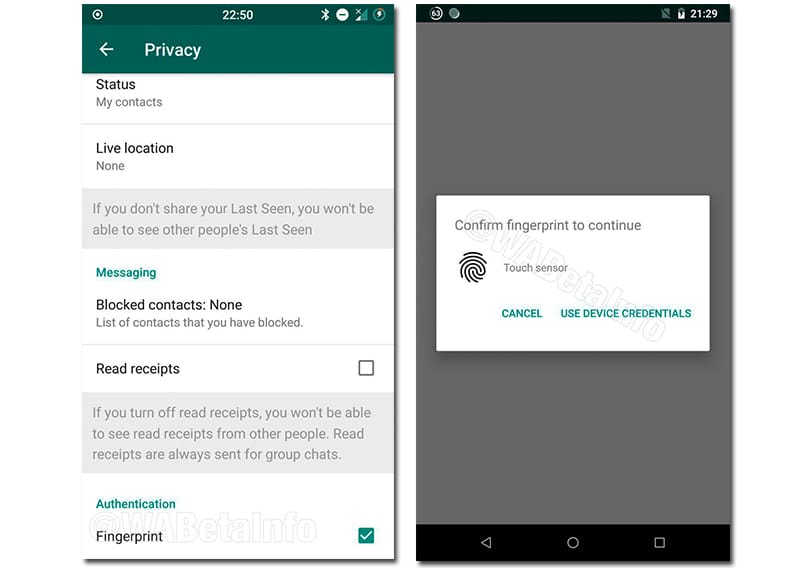
Once it arrives on our phone, we can configure it in the app's menu. The feature will be found within the privacy options (in Settings => Account), where a new section called, at least in English, " Authentication " will appear, with the option to activate or deactivate "Fingerprint" - you can see screenshots of what it will look like above.
Once set up, to access the app you'll need to use your fingerprint (you can configure multiple fingerprints, either to use different fingers or to grant access to other people). Without it, WhatsApp won't open . What do you think of this new feature? Do you think you'll use it?